

Every dollar raised from this event directly supports programs and events for El Paso families, Autistic adults, and their loved ones in our community.
El Paso Walk Frequently Asked Questions
What are my participation options?
Choose your pace — 5K Fun Run or 1-Mile Walk.
We’re excited to offer a 5K Fun Run that’s open to all ages, fitness levels, and abilities. This non-competitive, untimed run is all about having fun and enjoying the experience together.
Prefer something less vigorous? Our 1-mile walk is perfect for families, small children, and anyone looking for a more relaxed option. Everyone is welcome—come join us!
When and where is check-in and T-shirt pick-up?
Friday, April 24 | 11:00 AM – 7:00 PM
Check-in and event T-shirt pick-up will take place at our office:
Shoppes at Solana (2nd Floor)
750 Sunland Park Dr., Suite P06B
El Paso, TX 79912
How do I create or join a team?
Creating a team is easy! Once you begin the registration process and enter your name and details, you’ll be prompted on the second page to create or join a team.
This is where you can set up your team using the Team Fundraiser option shown below:

Teams may choose to fundraise or simply participate together — but all teams are created through the Team Fundraiser feature on this platform.
Every dollar raised during the Walk directly supports El Paso-based programs and services for Autistic adults and Autism families in our community. Top fundraising teams will be recognized.
I already registered — how do I join a team now?
If you already registered but want to join a team, you can do that from your RunSignup account profile. You will not be charged again.
Step 1: Log in to your account
Click the profile icon in the top right corner of the RunSignup page and log in with the email and password you used when registering.

Step 2: Go to Manage Registration
After logging in, select Manage Registration for the event, then open the Fundraiser tab.

Step 3: Become a fundraiser and select your team
To join a team, you must set yourself up as a fundraiser first (this connects your registration to the team). It can feel like donating again, but you are only setting a fundraising goal.
- Select Become a Fundraiser and complete the short setup.
- Choose Team Fundraiser.
- Select the team you want to join from the list at the bottom of the page.
You will NOT be charged again. You are simply creating a fundraising page/goal so your registration can be linked to a team.

How do I move someone I registered to my team?
If you registered someone else and want to move them to your team, you can update their registration from your RunSignup account.
Step 1: Log in to your account
Sign in to the RunSignup account you used to register participants.
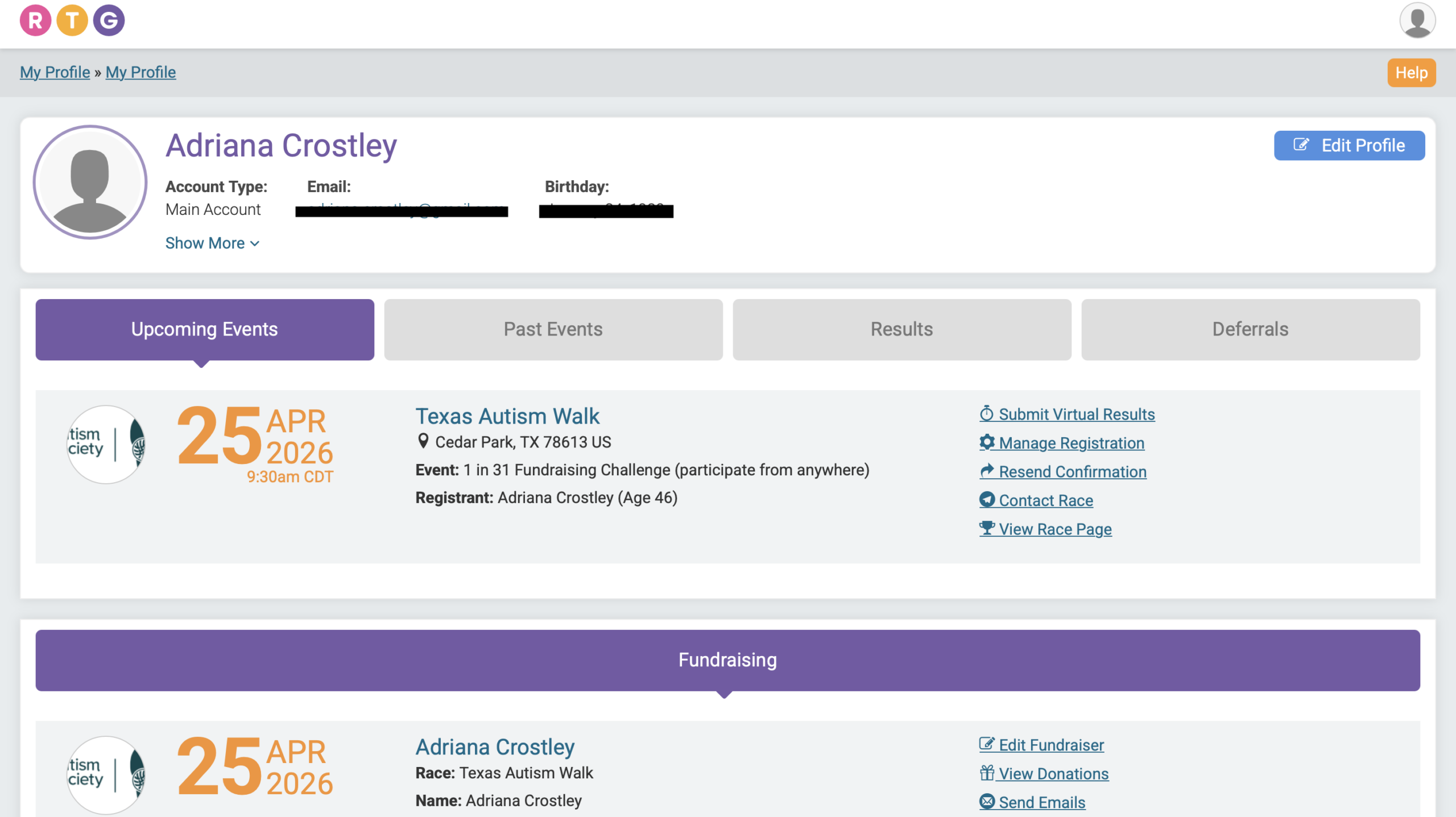
Step 2: Find the participant
Locate the individual you registered and click Manage Registration.

Step 3: Open the Fundraiser section
At the top menu of the registration page, click the Fundraiser option.

Step 4: Select the team and save
- Scroll down to the Team Fundraiser section.
- Select the team you want the participant to join.
- Click Save Fundraiser Changes.
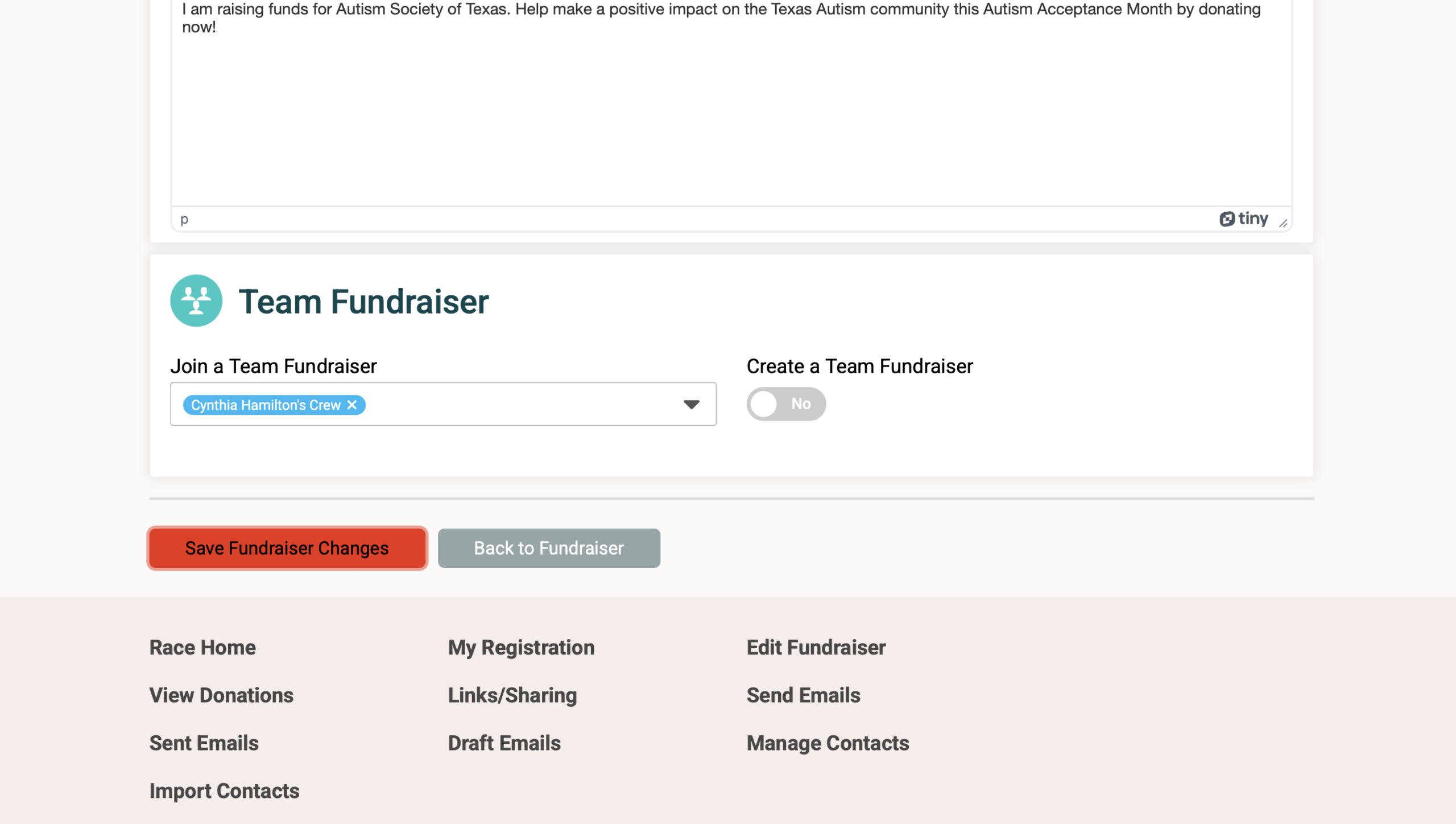
Once saved, the participant will be connected to your team.
What awards will be given?
Trophies will be awarded to 1st place in each of the following categories, with recognition given to 2nd and 3rd place:
- Largest Team
- Top Individual Fundraiser
- Top Fundraising Team
Are there opportunities and recognition for business teams?
Start a business team and fundraise your way to sponsorship.
Businesses that raise $500 or more by March 30 will have their logo featured on the official event T-shirt.
In addition, your business will receive recognition and promotional benefits corresponding to the sponsorship level you achieve, making this a great way to support the cause while increasing your visibility in the community.